
How to Get Free YouTube Subscribers
Start with a video people already watch. Give them a clear reason to return, offer a useful next video, and use your own results to decide what to try again.
This guide does not add subscribers to your channel. Every exercise is free, and no purchase or email signup is required to use the planner below.
Updated November 10, 2026 · by the SidesMedia editorial team · how we write these
A viewer can enjoy one video without knowing what your channel will help them do next. Make that next step specific. You will plan a two-video sequence, add a suitable end screen where available, and review views and subscriber gains separately.
Turn one useful video into a clear next step
1. Choose a follow-up worth returning for
Pick an existing video with enough viewing activity to learn from. Write the problem it solves, then choose one related question for the next video. For example, “Patch a bicycle tube” can lead to “Find what caused the puncture”. Each video should deliver its own useful answer.
Put a specific invitation after the useful result. Instead of “Subscribe for more”, try: “If the tyre goes flat again, the next video shows how to look for the cause. Subscribe if you want more practical bike-maintenance explanations.” This is an illustrative script, not a claim that these words increase subscriptions.
Promise only what you can deliver. If the follow-up is already published, direct viewers to it. If it is still planned, say so and avoid presenting it as something they can watch now.
Your two-video plan: This video helps with ____. The natural next question is ____. My follow-up answers it by ____. The invitation I can honestly make is ____.
2. Offer the next video at the end
In YouTube Studio on a computer, open Content, choose the video, then Editor → End screen. Add a relevant Video or Playlist element and, where appropriate, a Subscribe element. Preview the placement and timing, then save.
The video must be at least 25 seconds long; end screens occupy the final 5–20 seconds. They are unavailable on videos set as made for kids and may not appear in every viewing context. Leave room for the elements so they do not cover the explanation.
Source: YouTube: end-screen eligibility and setup
If an end screen is unavailable, organize related eligible videos into a clearly named playlist on your channel and tell viewers what it contains. This gives people a useful route through your work; it does not guarantee that they will subscribe.
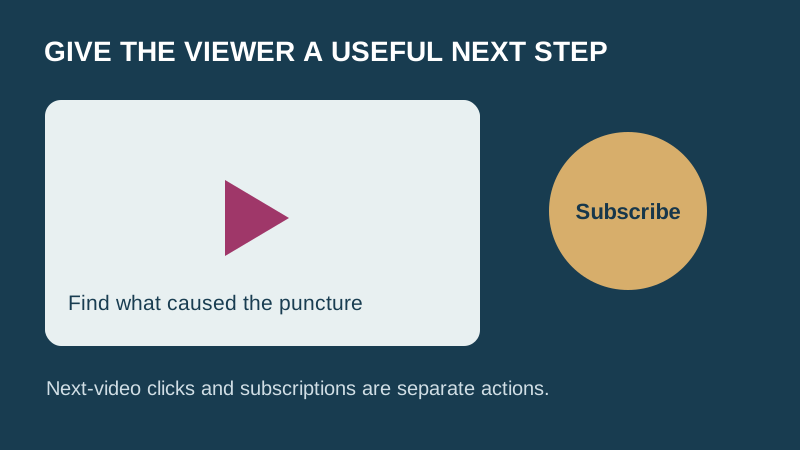
A relevant next watch and a separate subscribe choice
Original storyboard, not a YouTube Studio screenshot. A next-video click and a subscription are different actions.
3. Review what viewers actually did
Use the same video and date range when comparing views and subscribers gained in YouTube Analytics. Keep gains, losses and net change distinct. For your own notes, subscribers gained divided by views and multiplied by 1,000 gives gains per 1,000 views; it is not a unique-viewer conversion rate or a target.
Review the end-screen element click rate separately. A click on the next video is not proof of a subscription. Where enough data exists, open Analytics → See more → Subscription source to learn where people subscribed. A small channel may not have that breakdown.
Source: YouTube: subscription sources
Check another comparable period before changing the plan again. Different topics, audiences, traffic sources and video ages can explain a difference. Use the records to choose the next question, not to claim that one script or end screen caused growth.
Illustrative arithmetic — not a real channel result
Video A
- Views
- 1,000
- Subscribers gained
- 4
- Gains per 1,000 views
- 4
4 ÷ 1,000 × 1,000 = 4
Video B
- Views
- 800
- Subscribers gained
- 6
- Gains per 1,000 views
- 7.5
6 ÷ 800 × 1,000 = 7.5
Video B has fewer views and more subscriber gains in this example. That is a useful observation to investigate, not proof that its invitation worked better. If views are zero, leave the rate blank.
Copy your next-video plan
Current video and the problem it solves:
Relevant follow-up (published or planned):
Honest invitation to return:
End-screen elements, if eligible:
Change made and date:
Comparison dates and video age:
Views:
Subscribers gained:
Subscribers lost or net change (label clearly):
Gains per 1,000 views (blank if views = 0):
End-screen element click rate, if available:
Subscription source, if available:
One question for the next review:
Download this worksheet (.txt)
Choose one existing video and one relevant follow-up. Write the invitation, check end-screen eligibility, and save your blank record before making the change. If too few people see your videos to learn from them, start with the free YouTube Views guide.
The free planning exercise above is complete. SidesMedia also offers a separate paid subscriber service. It is not required for this guide and does not guarantee returning viewers, watch time or monetization eligibility. You can buy YouTube subscribers from real, active accounts — delivery is gradual, never needs your password, and every order is backed by a refill guarantee.
One email with our complete checklist for growing on every platform, plus the tactics we send subscribers first. No spam, unsubscribe anytime.
Free tools to plan your growth
Or read every YouTube growth guide we've published.
Keep growing: Free YouTube Views guide, YouTube subscriber packages.
Frequently asked questions
Can this guide give me 50 or 100 free subscribers?
No. It does not send subscribers or guarantee a number. It gives you a free exercise for making your channel’s next step clearer and reviewing what viewers do. There is no email signup or purchase requirement.
Why do I get views but few subscribers?
A viewer may have found the answer they needed without knowing what your next video offers. Review the connection between the current video, the follow-up and your invitation. The numbers alone do not establish the cause.
Why can’t I add or see an end screen?
Check the video’s eligibility and audience setting. Videos shorter than 25 seconds and videos set as made for kids do not support end screens. Availability also varies by viewing context. Use YouTube’s current help page to check the limitation that applies to you.
Why is Subscription source missing?
YouTube may not show this breakdown when there is too little traffic in the selected period. Record the views and subscriber figures you can see and leave unavailable fields blank.
Source: YouTube: subscription sources
Is sub4sub a good way to complete this exercise?
No. YouTube prohibits subscription exchanges and artificial engagement. This exercise asks you to give interested viewers a useful reason to return, not to exchange or require subscriptions.
Source: YouTube: fake engagement policy
Does a higher subscriber count guarantee monetization?
No. This worksheet is not a monetization eligibility check, and a paid subscriber package does not establish eligibility. Check the current YouTube Partner Program requirements for your country and channel rather than relying on a single subscriber threshold.